|
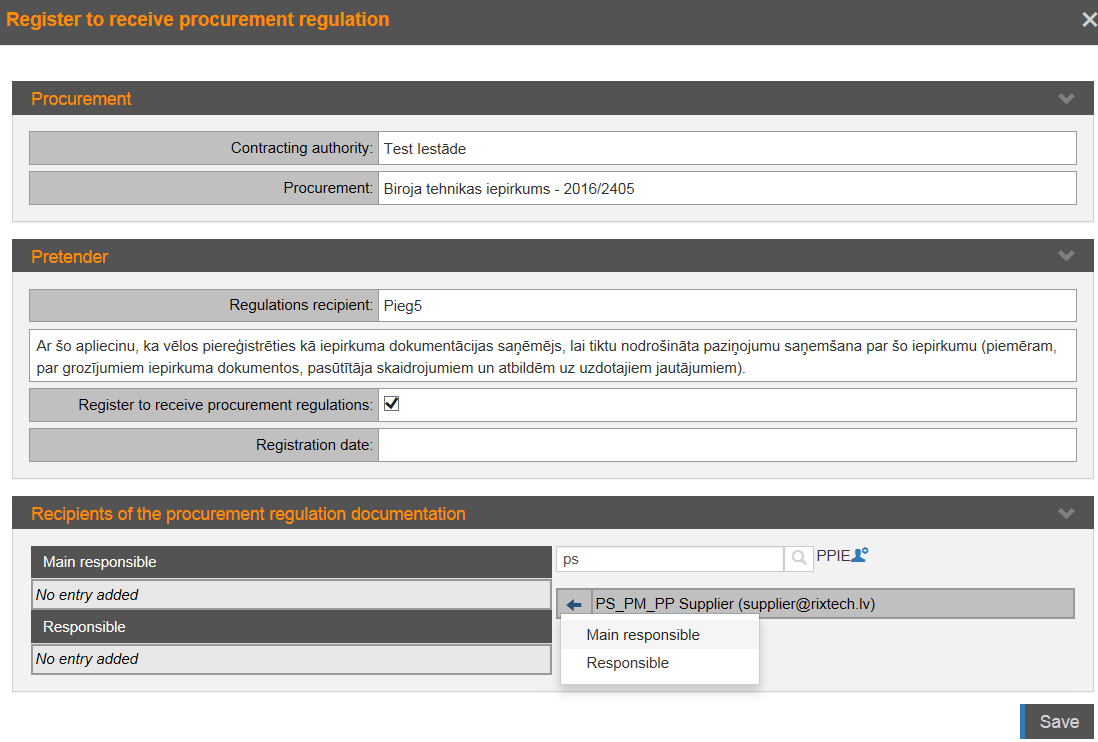
Recipients of the procurement regulation
documentation |
Users who will receive the procurement
documentation, reminders about the approach of the proposal submission
deadline, also the customer answers to the questions – main responsible
and responsible.
Note! Block is available if the pretender is
registered for the receipt of the regulation, i.e. the check box is
selected.
Add responsible persons, by typing user’s name,
surname and searching. Click the arrow icon  and specify the degree of
responsibility. and specify the degree of
responsibility.
If necessary to add new system users, click the icon
 – opens the form where the
request to system administrator can be sent. – opens the form where the
request to system administrator can be sent. |
 at the entry in procurement list – in
column „Favorite” – opens the form to register for regulation and specify
persons who will receive information. Persons specified in this form applies to
all procurement’s stages and all proposals prepared by organization. Information
about those persons isn’t available to Contracting authority.
at the entry in procurement list – in
column „Favorite” – opens the form to register for regulation and specify
persons who will receive information. Persons specified in this form applies to
all procurement’s stages and all proposals prepared by organization. Information
about those persons isn’t available to Contracting authority.  at the entry in the list of
procurements.
at the entry in the list of
procurements.