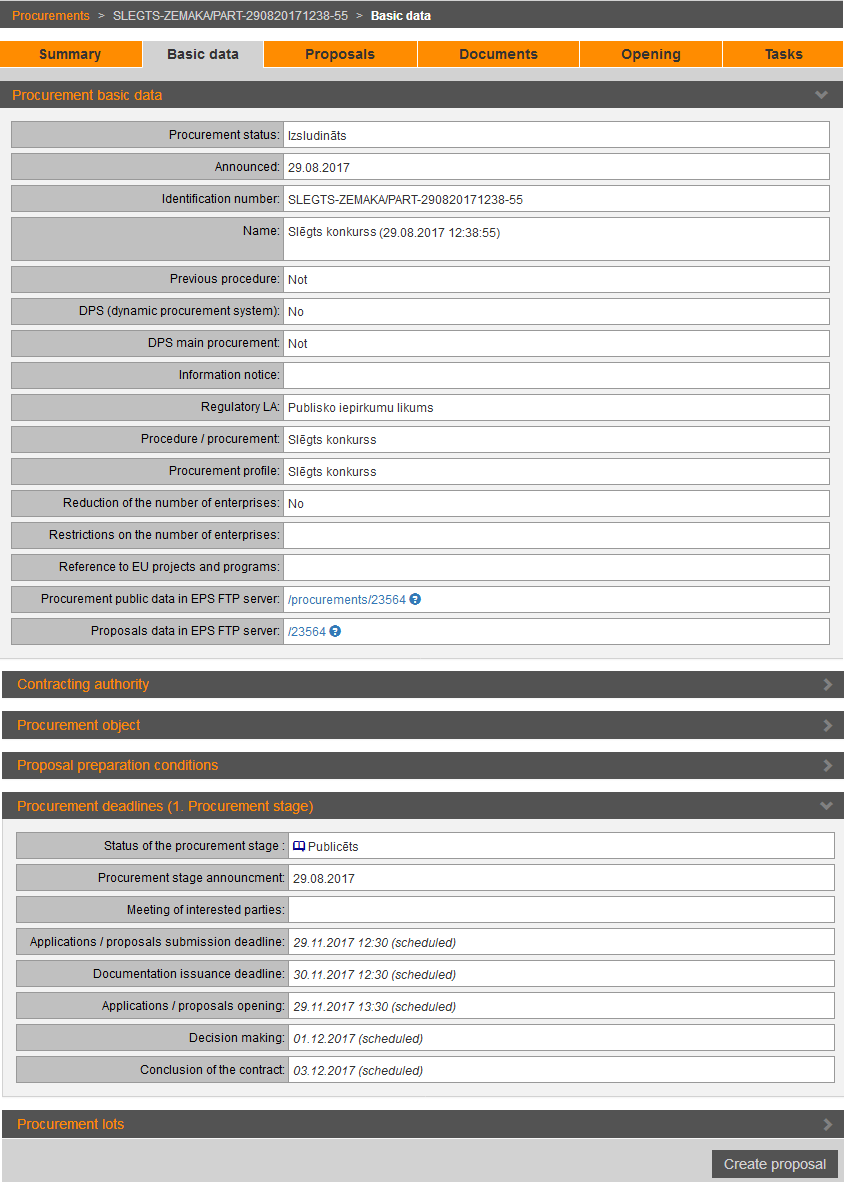
To view procurements basic data and start preparation of the proposal, open the procurement’s section „Basic data”.
The section contains procurement’s basic information and the button to start the proposal. Only registered supplier users can prepare and submit a proposal in the EPS.
Picture 168. Procurement’s basic data
|
Interface element |
Description |
|
Procurement basic data |
Information about procurement. When clicking the hyperlink Procurement public data in EPS FTP server and entering EPS username and password, opens the FTP folder in which public procurement documents, such as system generated requirement documents (PDF files for each procurement part) are stored. This folder is available to all EPS users – both the Commission and the tenderers. Files are available only for download, they cannot be edited, deleted, or uploaded. When clicking the hyperlink Proposals data in EPS FTP server and entering EPS username and password, opens the FTP folder in which proposal documents, such as proposal ready for submitting, are stored. This folder is available only to users from pretender’s organization. Files are available only for download, they cannot be edited, deleted, or uploaded. See more detailed description about FTP server 15.17 Proposal and procurement files on the FTP server. |
|
Contracting authority |
Information about Contracting authority. |
|
Procurement object |
Information about procurement object. |
|
Proposal preparation conditions |
Information about winners’ selection, the preparation and submission of the proposal. |
|
Procurement deadlines |
Information about proposal submission, opening, decision making etc. Proposals may be submitted until the time specified in the field Application / proposal submission deadline (i.e. if the time specified, for example, 12.30, proposals may be submitted till 12.29.59, but at 12.30.00 it is late). |
|
Create proposal |
Click to start preparation of the proposal. |