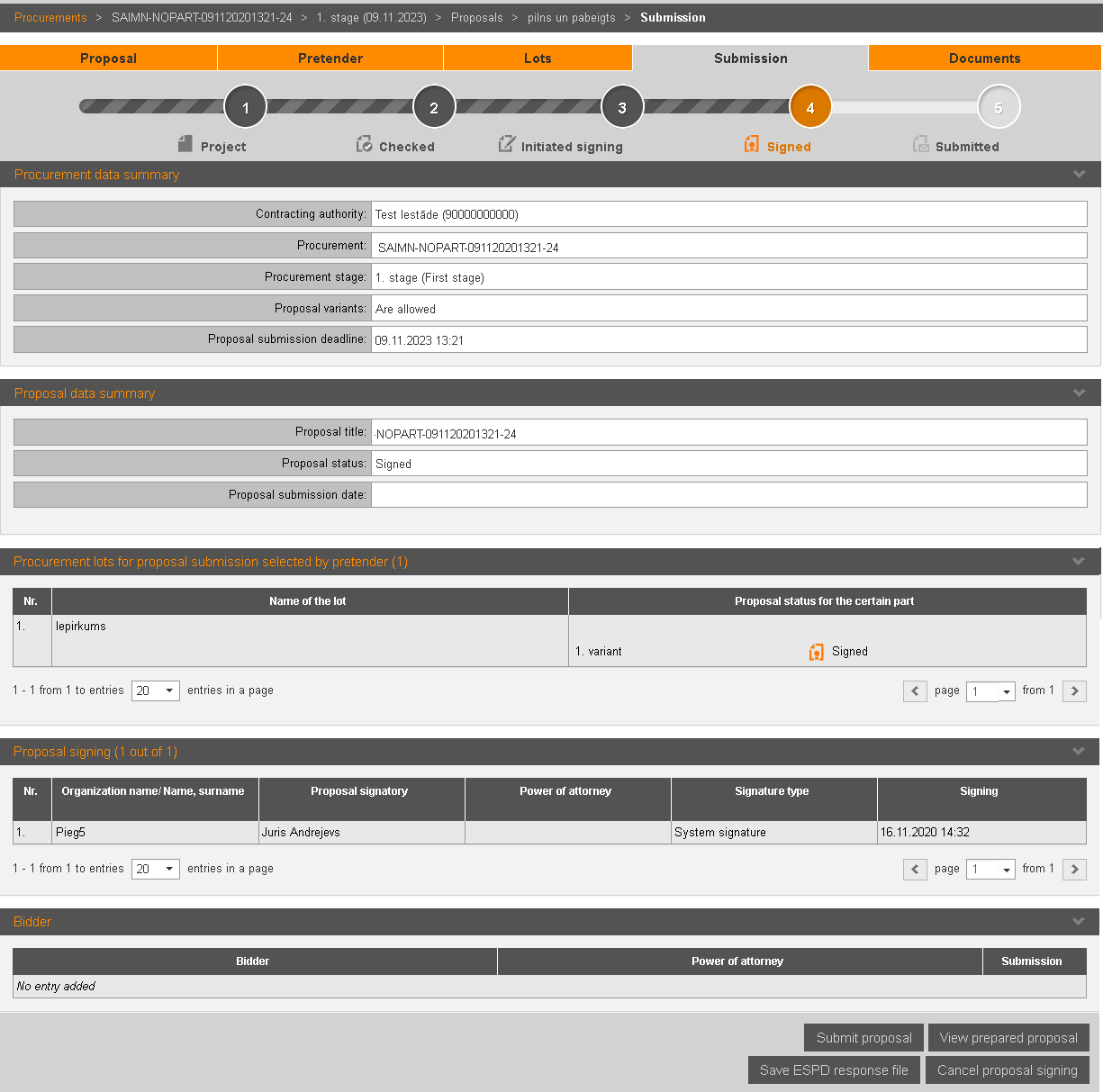
To submit the proposal, in the proposal section „Submission” click the button Submit proposal – proposal is submitted and its status becomes ‘Submitted’.
Note! Proposals may be submitted until the time specified in the field Proposal submission deadline (i.e. if the time specified, for example, 12.00, proposals may be submitted till 11.59.59, but at 12.00.00 it is late).
Picture 200. Proposal’s submission information
System sends notification about submission to all signatories and to person who submitted the proposal. The same notification system sends in a case the proposal is submitted by another person (not the person stated as bidder in the proposal). In addition system sends a notification that bidder has been changed to the bidder and to the responsible person stated in the proposal.
If ESPD exclusion and selection requirements were applied in the procurement, it is possible to save entered ESPD responses for reuse in other procurements: Save ESPD response file (see 15.8.5 Save ESPD response file in system).
Note! When proposal is in the statuses of ‘'Initiated signing' and 'Signed', the information in the form is automatically refreshed every 3 seconds
You can use the icon  at the bottom right of the screen to
scroll the shape to the bottom if the shape is not scrolled to the
bottom.
at the bottom right of the screen to
scroll the shape to the bottom if the shape is not scrolled to the
bottom.