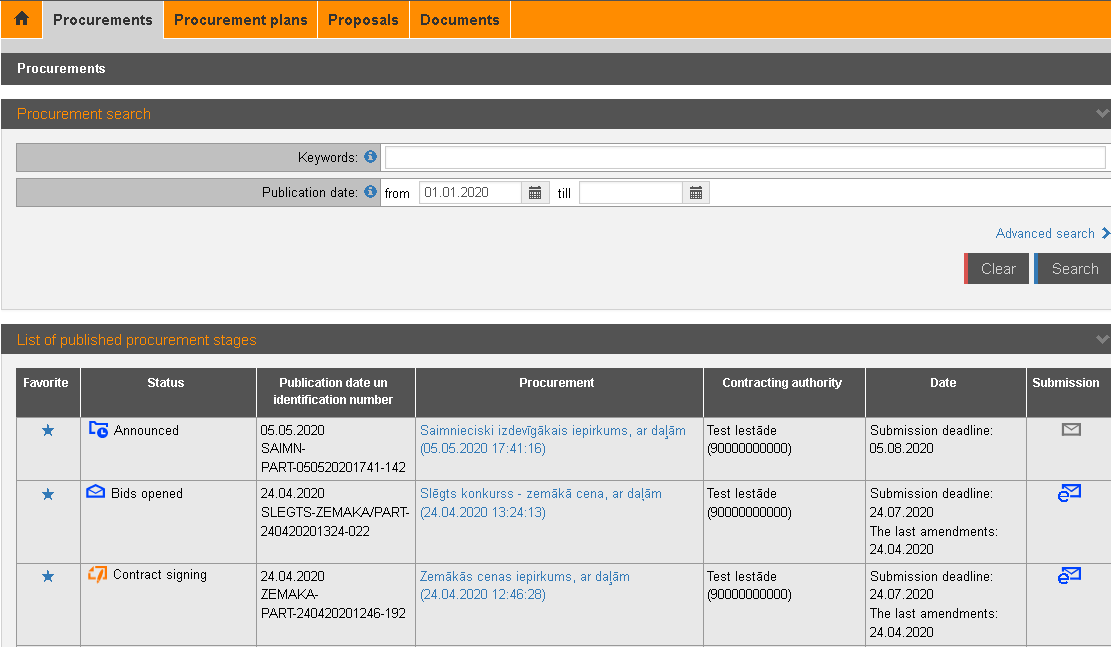
To view procurements, open the e-tenders subsystem’s section „Procurements” – the list of procurements and simple search form is available.
Procurement search and basic information are available, as well as registered and authenticated supplier users can register to receive the regulation.
Picture 165. Procurements simple search and list
|
Interface element |
Description |
|
Search criteria |
Procurements selection criteria – status, procurement profile etc. Criteria to search for procurements: − Keywords – to find procurements where title, identification number or Contracting authority contains entered text. − Publication date – date of the procurement’s first announcement. Default date from is 1st January of the current year. |
|
Advanced search |
Click to open the procurements advanced search (see 14.2 Procurements advanced search). |
|
List of published procurement stages |
Procurements according to defined search criteria sorted descending by announcement date, e.g., newest at the top of the list. If pretender’s organization has registered to
receive the regulation, the blue star For procurements where proposals are intended to
submit in EPS, the blue icon For publications (see 28 Publications in EPS – for
pretender) where proposals are intended to submit outside the EPS, the
blue icon To view procurement data, click the tittle. If proposal is already created, the proposal information is opened. Otherwise – the procurement base data form is opened. |
 is displayed at the procurement.
To register to receive procurement regulation, click the icon – grey
star
is displayed at the procurement.
To register to receive procurement regulation, click the icon – grey
star  (see
(see  is displayed in the
Submission column.
is displayed in the
Submission column. is displayed in
the Submission column.
is displayed in
the Submission column.